Running a WoW Private Server Client on Apple Silicon: Three Dead Ends and a Better Answer
I run a small World of Warcraft private server on my homelab. It’s an AzerothCore realm on the Wrath of the Lich King patch, which means the client is version 3.3.5a, build 12340. I already play it fine from a Windows desktop on the network. The question I set out to answer was simple: could I also log in from my MacBook Pro, without ever touching Windows on the Mac?
The short version is that I got the game to launch, watched it crash in a very specific way, traced the crash to its root cause, and then made peace with the fact that the right tool for this job is a completely different machine. Here’s the whole trip.
The thing that makes this hard
WoW 3.3.5a is a 32-bit game from 2010. That one fact is the entire story.
My MacBook Pro is an Apple Silicon machine (M3 Max). Apple Silicon is ARM. The game is compiled for 32-bit x86. macOS hasn’t shipped a 32-bit runtime since Catalina. So to run this old game on this new Mac, you’re asking for three separate translations to happen at once:
- ARM CPU pretending to be x86, via Apple’s Rosetta.
- A 32-bit x86 program running inside a 64-bit world, via a Wine compatibility layer.
- Windows API calls being answered by macOS, which is Wine’s actual day job.
Each of those layers is fine on its own. The problem lives where they stack. I didn’t know that going in, so I worked through the options in order of least effort.
Attempt one: Whisky
Whisky is the friendly, free, Apple Silicon native Wine wrapper that everyone recommends first. Install it, make a “bottle,” point it at the game, done. I had it installed already.
Every bottle I created vanished from the list the moment I made it. That’s not a normal failure, so I looked at what Whisky writes to disk. The bottles were being created as folders but never registered, and the reason was clear once I found it: Whisky had no engine installed. Its Wine and graphics support libraries were never downloaded.
When I checked the download servers, they returned 404. Whisky’s development wound down in 2024, and the engine builds it needs at install time have since been taken offline. The app still launches, but it can’t fetch the parts that make it work anymore. It’s quietly abandonware now. Nothing I did wrong, and nothing I could fix from my side.
Verdict: dead end, through no fault of the setup.
Attempt two: Apple’s Game Porting Toolkit
If the goal is Windows games on Apple Silicon, Apple’s own Game Porting Toolkit sounds like the obvious pick. There’s a community package that bundles it with a Wine build, so you don’t need an Apple developer login to get it. I installed that, verified the Wine binary ran, confirmed the Metal translation framework was present, built a fresh prefix, and launched the game.
It crashed instantly. The log showed a memory assertion deep inside Wine’s virtual memory setup.
This one has a clean explanation. The Game Porting Toolkit ships only a 64-bit Wine. It has no 32-bit binary at all. It was built to help studios evaluate modern 64-bit games, and a 2010 32-bit game is simply outside what it handles. I confirmed the game was 32-bit with a one-line check, saw that the toolkit had no 32-bit Wine to offer it, and moved on.
Verdict: wrong tool for a 32-bit game, by design.
Attempt three: WineHQ Stable
The correct category of tool for a 32-bit Windows game is a Wine build that actually supports 32-bit code. The official WineHQ Stable package installs on a Mac and runs under Rosetta, and it advertises 32-bit support. I installed it, cleared a Gatekeeper quarantine prompt, rebuilt the prefix, set the game to windowed mode so it couldn’t trap me in a fullscreen I couldn’t escape, and launched.
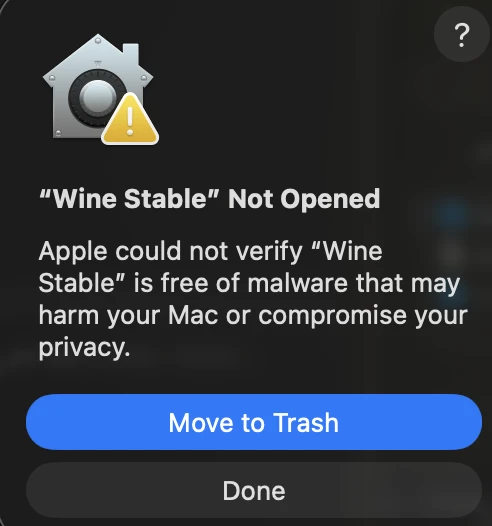
The first speed bump. macOS refuses to open the unsigned Wine build until you clear its quarantine flag. Harmless, and a one-line fix.
This time the game actually started. It rendered through Metal on the laptop’s GPU. And then it threw the error every long-time WoW player recognizes on sight:
ERROR #132 (0x85100084) Fatal Exception
0xC0000005 (ACCESS_VIOLATION)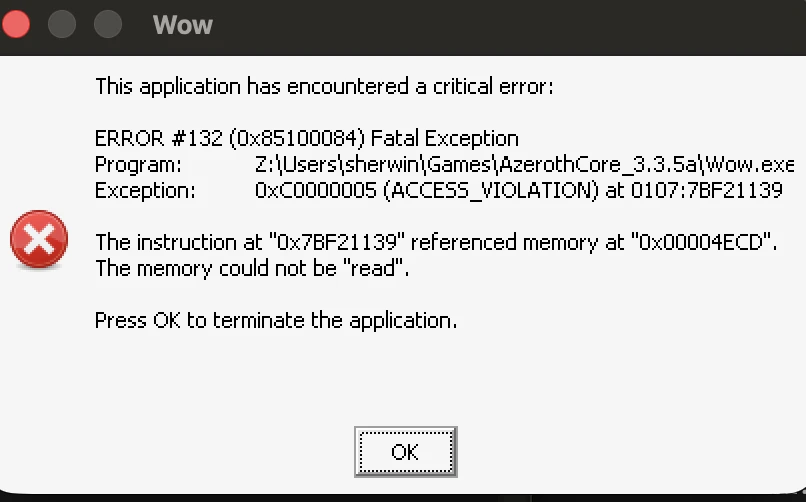
The dialog every long-time WoW player recognizes on sight. The game launched, rendered, and then died in the same spot every single time.
My first guess was the classic one. The client was copied from another machine, and WoW’s cache folder holds GPU-specific compiled data that’s invalid on different hardware. That’s the number one cause of Error #132 on a copied install. I deleted the cache and relaunched.
Same crash, same address, byte for byte. When a crash is that deterministic, the cache was never the problem. So I read the crash dump properly.
Reading the crash
The dump pointed the finger at a fixed instruction address and claimed the game was trying to read a low, near-null memory address. On the surface that looks like ordinary game code gone wrong. The interesting part was the raw bytes at the crash site:
8B 15 CD 4E 00 00 41 89 95 BC 00 00 00 9C 5A ...WoW’s crash reporter is a 32-bit program, so it printed those bytes as if they were 32-bit instructions, which is where the misleading “read a null pointer” message comes from. But look at what’s actually there. The 41 byte is a 64-bit register prefix. 9C is a 64-bit “push flags” instruction. 5A is a 64-bit “pop” into a 64-bit register. These aren’t 32-bit game instructions at all. This is 64-bit code.
That places the crash squarely in Wine’s 32-bit to 64-bit translation layer, the piece that thunks a 32-bit program’s calls into a 64-bit world. Not in the game. Not in the graphics stack. In the middle layer of the sandwich.
WineHQ’s current builds use a newer translation engine for this, and that engine is known to be unreliable for old 32-bit games. The game never really got going. It got far enough to hand control to the translation layer, and the translation layer fell over.
Verdict: the free, mainline Wine on Apple Silicon can’t cleanly run this specific 32-bit game today.
The pattern behind all three
Line the failures up and they tell one story:
| Tool | Result | Root cause |
|---|---|---|
| Whisky | Could not install its engine | Project retired, downloads offline |
| Game Porting Toolkit | Crashed on launch | 64-bit only, no 32-bit support |
| WineHQ Stable | Crashed after rendering | 32-bit translation layer is buggy |
The one tool that reliably runs 32-bit games on Apple Silicon is the older, more mature translation approach that commercial CrossOver kept and mainline Wine moved away from. That path exists, and there’s a free repackage of it as well as a paid trial. I had a working option in front of me.
But by this point the real lesson had landed, and it had nothing to do with which Wine to pick.
The better answer: stop fighting the CPU
Every single problem here was Apple Silicon specific. The dead engine downloads were bad luck, but the two real crashes were both about running a 32-bit x86 game on an ARM Mac through stacked translation.
I’ve got a spare Windows laptop sitting unused, and it’s x86 hardware. I haven’t wiped it yet, so everything below is reasoning rather than results. But on paper, putting Ubuntu on that laptop removes the problem instead of working around it:
- The game is x86 and so is the CPU, so there’d be no CPU translation at all. Rosetta drops out of the picture.
- Linux’s 32-bit support has been mature and boring for twenty years. Running old 32-bit Windows games on Linux is a well-trodden path.
- Lutris is built for this exact shape of problem, handling the Wine version, the 32-bit libraries and the graphics translation for you. I haven’t run it against this game yet.
- A 2010 game should run comfortably on modest laptop hardware.
- It costs nothing, and there’s no trial clock.
Put plainly: the Mac needs three translation layers and still crashes. The Linux laptop would need one, and it’s the layer Wine was built for. The harder machine is the one I was trying to force. The easy machine may have been the spare laptop the whole time.
The question I started with was whether I could run this on the Mac without Windows. The better version of that question turned out to be whether I could run it on cheap x86 hardware without Windows. I haven’t answered that one yet, but it’s a much easier question, and it’s the one I’m going to test next.
Where I landed
For now this is on hold while I decide whether it’s worth the time. I cleaned every trace of the Mac experiments off the laptop, from the wrappers to the prefixes to a stray system framework that one installer dragged in. The Mac is back exactly where it started.
When I do pick it back up, it’ll be on the Ubuntu laptop, with Lutris doing the heavy lifting. If you’re trying to play a private server realm from an Apple Silicon Mac and the client is any pre-2012 32-bit game, save yourself the afternoon I spent and reach for a Linux box on x86 first. The Mac can be made to do it. That’s not the same as it being the right machine for it.
This is part of an ongoing series on my homelab. If you want the follow-up where I actually get the Linux laptop running the game, that post is still to come.
Leave a comment
Comments are moderated, so it may take a bit before yours appears. Your email is never published.